A Reader’s Map for Following One Regional Story
A reader’s map for following a regional story helps you sort updates by date, keep links findable and spot which new reports genuinely change the picture.
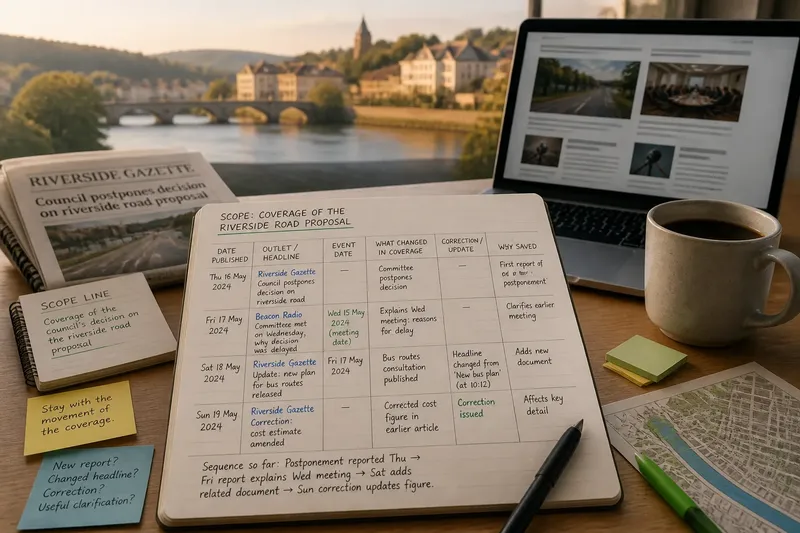
You open a local news app for an update on a council decision and find three headlines, a radio clip and a social post quoting last week’s report. A reader’s map for following a regional story turns that jumble into a usable sequence: what changed, when the change was reported and which links are worth reopening.
This is a reading aid, not a verdict on the people in a story. Keep the focus on the movement of the coverage: new reports, revised headlines, corrections and documents that alter what a reader can follow. A notebook, document or spreadsheet is enough.
Set a boundary for the story you are tracking
A local issue can quickly branch into neighbouring subjects. A proposed road may lead to reports about planning meetings, bus routes, shops and party politics. If you collect every related item, the record becomes a scrapbook rather than a map.
Write a scope line such as “Coverage of the council’s decision on the riverside road proposal”. Use it to decide whether a new item belongs. A report on the decision fits; a general article about traffic elsewhere may not, unless it connects directly to the proposal.
Change the scope if the story’s centre shifts, and note why. The point is to manage your attention, not to pretend related events are irrelevant.
Use dates to see how coverage develops
News updates can appear under an earlier headline, and later reports may recap events in a different order. Record when an item was published separately from when the event it describes took place. If the report does not give an event date, leave that field blank rather than guessing from “earlier this week”.
Imagine you are following a fictional school-transport proposal. A local paper publishes an update on Thursday saying a committee has postponed its decision. A radio station posts a report on Friday explaining that the committee met on Wednesday. In your record, enter Thursday and Friday as publication dates, and Wednesday as the meeting date only for the radio report. The sequence then shows that Friday’s item explains an earlier meeting rather than reporting a fresh decision.
Check dates before treating two reports as contradictory.
Keep a working log that is easy to scan
A useful map is less about saving everything than making the next visit to the story easier. For each item, capture only details that help you recognise it and understand why it belongs.
- Headline and outlet: If both are clear, enter them with a link; if the link is unavailable, add enough identifying detail to find the item again.
- Publication date: If the outlet displays a date, record it; if it does not, mark the date as unclear instead of inferring one.
- Event date: If the report names a date for the event, record it separately; if it gives only a vague timeframe, leave the field open.
- What changed in the coverage: If the item adds a new development or clarification, describe that briefly; if it repeats earlier material, mark it as a recap or leave it out.
- Correction or update: If the outlet labels a correction or revises its report, note what changed; if no revision is shown, do not assume the article has been updated.
- Why you saved it: If it helps explain the story’s sequence, keep it; if you cannot say how it helps, skip it or revisit the scope line.
These fields keep the log centred on how coverage changes. You can add a note when a headline has changed or an old link now leads to an updated page, so you remember why the item looks different when you return.
Choose a format you will actually revisit
A spreadsheet is handy when you want to sort entries by publication date or filter for corrections. A notebook suits a simple chronological log, provided each new entry begins clearly. In a document, use dated headings so that later additions do not disappear in a long block of text.
Keep links beside the entry they identify. Give the file a neutral name, such as “Riverside road coverage”, rather than a title that declares who is right. A small, readable record is more useful than a complicated system you avoid opening.
How do you keep the map useful?
What should I save from a live news update?
Save the link, the displayed publication or update date, and a short note about what changed. If the page is later revised, preserve the earlier entry’s date and add a new note rather than silently rewriting your record.
How do I handle a changed headline?
Note the headline you saw and the date you saved it, then add the current wording if it changes. If the outlet explains the change, include that explanation; if it does not, record only the visible difference.
When should I leave an item out?
Leave it out when it repeats the existing coverage without a new development, correction or useful clarification. If you are unsure, compare it with your scope line and keep it only if it helps explain how the story is being reported.
How can I keep the log from growing endlessly?
Pause when new items add no meaningful change to the sequence. You can return if a fresh report, revised page or correction appears; you do not need to save every mention of the story.
Work through a small update sequence
Say you are tracking a fictional proposal to alter a market-square road. Your starting inputs are a notebook, a scope line reading “Coverage of the market-square road proposal”, and two links: a Monday report about a postponed council decision and a Tuesday article saying the council met on Monday. You take these actions:
- Write each headline, outlet and displayed publication date on a separate line.
- Record Monday as the event date only where the Tuesday article explicitly identifies it as the meeting date.
- Summarise the first report as “decision postponed” and the second as “Tuesday report says meeting took place Monday”.
- Compare the items: the later publication describes the earlier meeting, so mark the sequence as clarification rather than a new decision.
- Check whether either page shows a correction or update note. If it does, add that note; if it does not, leave the correction field blank.
The resulting map says what appeared on each publication date and prevents the Tuesday report from looking like evidence of a second meeting. It does not settle why the decision was postponed; that is outside what these two entries establish.
Let each entry earn its place
Before saving another item, ask whether it adds a report, a changed headline, a correction or a clearer point in the coverage sequence. If it adds none of those, the map can stay as it is.
A reader’s map for following a regional story works best when it is easy to reopen and honest about what its entries contain. Keep the dates and links close together; that small habit makes the next update simpler to place.