The Screenshot That Pretends to Be the Whole Story
A news screenshot can hide its date, source or surrounding lines. Use this repeatable check to find the original and see what the crop leaves out.
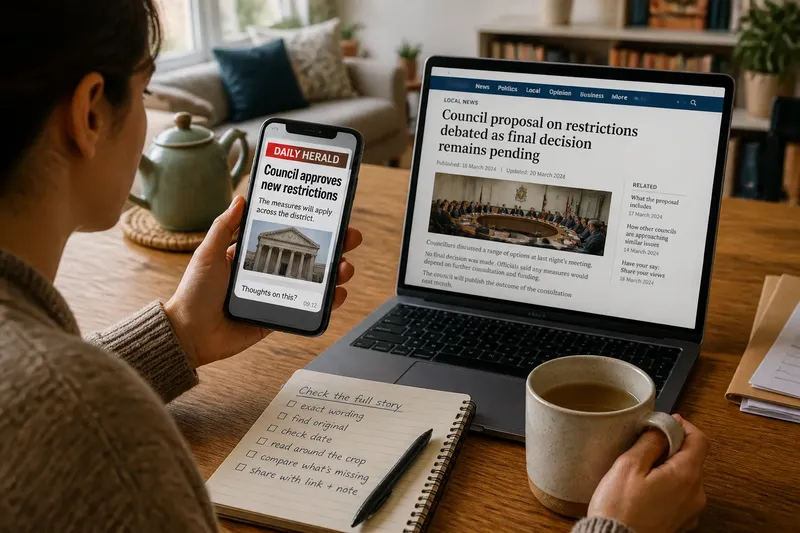
A news screenshot lands in a group chat just as you are making tea: a bold sentence, a familiar logo and no link. The claim may be accurate, but the image alone rarely tells you what was published, when it appeared or what sat just outside the frame. A news screenshot is a fragment, not a record of the whole story.
You do not need to investigate every image as if it were a major expose. A short routine can help you decide what the screenshot establishes and what remains unknown. The useful habit is to move from the image back to its source, then check the date and the nearby context before sharing or drawing a conclusion.
Start with the image, but do not stop there
First, read the screenshot literally. Note the words that are visible, any outlet name, the apparent headline or caption, and whether the image shows a social post, a page from a news site, a television graphic or a message about an article. Keep the claim narrow: “This image displays these words” is different from “This outlet published this report” or “The report proves this claim”.
Look at the edges. Is a headline cut off? Does the first visible line begin halfway through a sentence? Is there a date, author name, image caption or link preview that might identify the item? Cropping can remove information by accident, but it can also leave readers with a meaning the full item would qualify.
Do not treat a logo or familiar layout as proof of origin. Images can be copied, edited or assembled from separate pieces. Those possibilities are reasons to check, not reasons to declare the screenshot false.
Use a short routine when a screenshot appears
When you have a moment, follow the same sequence each time. It prevents a vivid crop from setting the terms of your judgement before you have found the item it claims to represent.
- Record the exact wording. Search a distinctive phrase in quotation marks, then try a shorter phrase without punctuation if nothing appears. Headlines can be altered in reposts, so search wording from the body as well if it is visible.
- Locate the original item. Prefer the outlet’s own site or verified account, and open the item rather than relying on a search-result preview. If the screenshot identifies a post, look for the original post and its thread, not only a repost of the image.
- Inspect the date. Check when the item was published and, if shown, when it was updated. A screenshot shared today can come from an older report; a later update may also change details that the original image preserves.
- Read around the crop. Read the preceding and following paragraphs, the full caption, or the replies and attached material around a post. Check whether nearby text attributes a claim, expresses uncertainty or places it in a different time or situation.
- Compare what is present and absent. Ask which omitted lines would change your understanding. Then describe the result precisely: the screenshot matches the original wording, leaves out a qualification, or cannot yet be matched to an original.
Keep the original link beside the image if you discuss it. A link makes it easier for someone else to check your reading rather than having to trust another crop.
Check the date and the edges before judging meaning
Date is not a minor detail. A report about a proposal may be passed around after a decision has been made; a page may also be updated while an old screenshot continues to circulate. Compare the screenshot with the page as it appears now, and notice any publication or update label. If the page does not make its revision history clear, avoid claiming that the screenshot captures the current version.
Then examine the material around the quoted line. A sentence may follow a phrase such as “officials said” or “the agency has not confirmed”, which changes whose claim it is and how firmly the report presents it. A caption may identify an image as illustrative, or a paragraph above the crop may explain that a figure refers to a particular place or period. The omission does not automatically make the screenshot deceptive; it does mean the crop cannot carry the full meaning on its own.
Say you receive a cropped image that reads, “Council approves new restrictions”, with no date or link. You search the phrase, open the council report linked by the local outlet, and see that the headline belongs to an earlier proposal story; the next paragraph says a final decision is still pending. The observable result is not that every detail is settled, but that the crop leaves out a qualification that changes what a reader might infer.
What should you do if the original is hard to find?
What if an exact-phrase search returns nothing?
Try a shorter distinctive phrase, remove punctuation, and search the outlet name alongside a key term. If the image shows only a social post, search the account’s visible wording and check whether a link or thread is attached.
What if the page has changed since the screenshot?
Compare the visible wording with the current page and note any publication or update label. If you cannot establish which version the screenshot shows, say that the versions differ or that the image’s date is unclear rather than treating either one as the whole record.
What if the screenshot has no outlet name or link?
Search an exact phrase and inspect likely sources, but do not assign the image to an outlet based only on its colours or typography. If no original can be located, the source remains unverified.
What if the crop is accurate but still gives a false impression?
Explain what is missing and why it matters: a date, a qualification, the speaker’s identity or the surrounding paragraph. Accuracy of the visible words does not by itself show that the crop represents the full report fairly.
Share the finding without turning it into another misleading crop
If you pass the item on, include the original link and a brief note about what you checked. “This is an older headline; the linked page says a decision is still pending” is more useful than “fake” when the words are genuine but the context is missing. If you cannot find the original, make that uncertainty plain.
You can also choose not to circulate the image. Sharing a screenshot to warn others may still extend its reach, especially when the caption repeats the claim more prominently than the correction. A link, a careful description or no repost at all may serve readers better.
The next time a news screenshot arrives, start with its exact words, find the original, check the date, and read beyond the crop. That small routine will not answer every question, but it gives you a firmer basis for saying what the image shows—and what it leaves unresolved.